Yes, i try.
I also thought about TH3D but I didn’t have time to deal with it.
The screen is blue and I can no longer connect to the printer with Pronterface or slicer.
Dumb question, can you flash back to the original configuration, i.e., start over again from the beginning?
I was wondering the same.
Too bad that Pronterface can’t connect. That pretty much says the firmware is not working. Hopefully, the bootloader still is.
In the end, I succeeded. I’ll tell you later.
Wow, nothing like a cliffhanger to give people anxiety ???
In brief:
- Using the method suggested by Creality locks the board and corrupts the bootloader. I tried several times and each time he did the same.
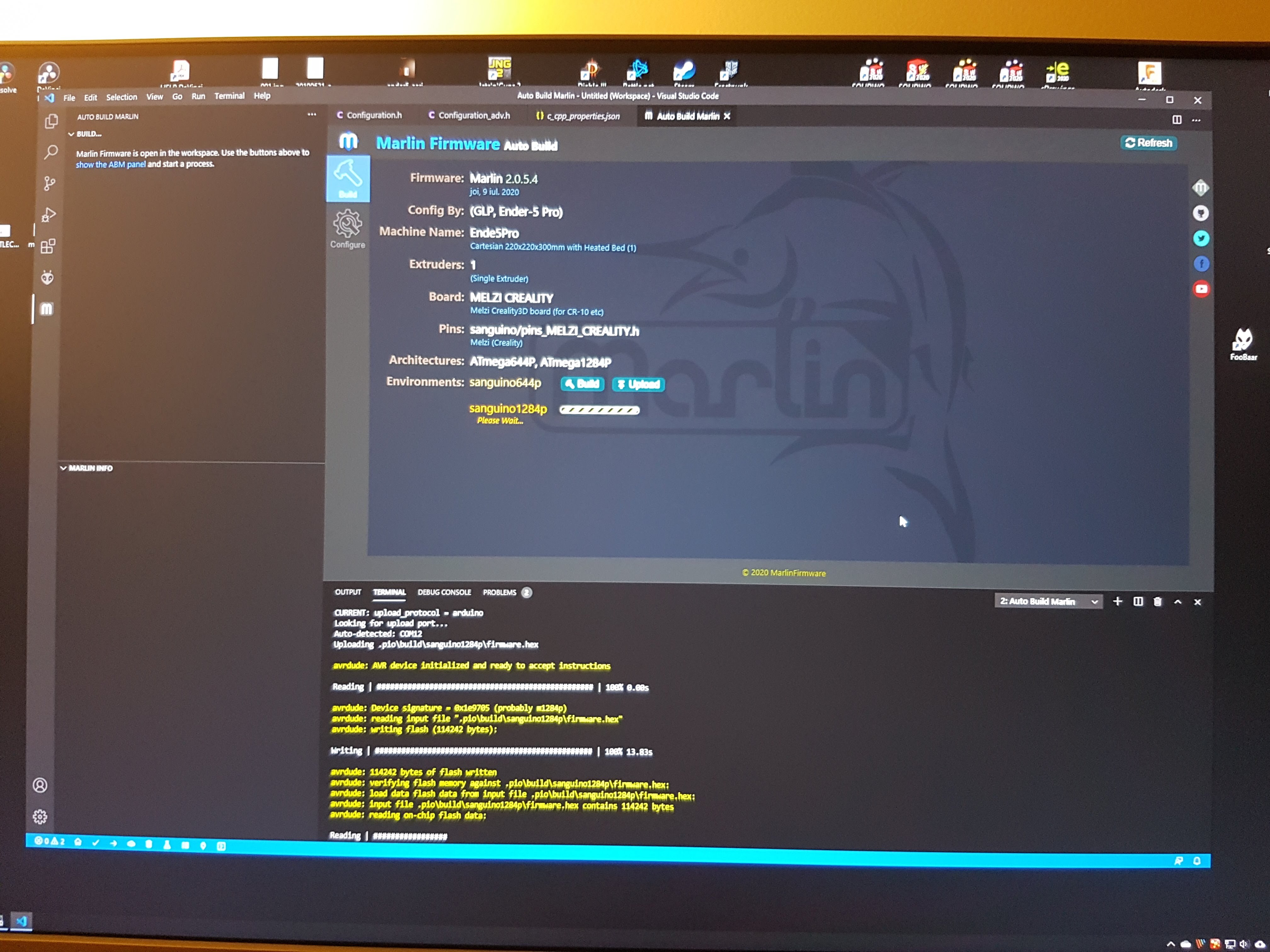
- I installed the bootloader, using an ARDUINO MEGA2560 (from Badminton Machine).
And after that I was able to do the normal update from VisulCode (https://platformio.org/) thank you “Mr Doohickey” once again. - The only version i managed to compile was: Marlin 2.0.5.4. And I hardly managed to make room for it in memory.
- I still haven’t printed anything with the new firmware.
Problems:
I don’t understand how I print with BLTouch.
I leveled the bed (with BLTouch). I adjusted the Z offset, I saved the settings. Everything is OK.
I connected with “Pronterface”:
G28 - works
G29: Bed Leveling - unknown command.
I found in the code the settings from AUTO_BED_LEVELING_,
but when I activate it (whatever option) i don’t have space in the memory.
Do I need to activate them? Can I print without these options?
Thank you again for your support. 
You may not be able to print with BLTouch until you make room in memory for it. That’s 1 of the reasons I suggested the TH3D Unified firmware: they have a version, so I understand, that works with the ATmega1284P and has BLTouch enabled. I do not know what they omitted to make room for it, but it supposedly works.
I have just been listening in on this discussion which I understand very little about. But I am in awe of Ender5r and MrDoohickey (however it is spelled) for sticking with you.
All anyone has to do is think of a field where they were once neophytes and depended on people with more experience to help them come to grips with it. I think it behooves anyone who can. to offer what help they can.
Now, as far as 3D printing goes, I don’t really have much experience, but I do have decades of experience with all kinds of tech, and particularly, I have a ton of experience dealing with new and innovative tech. When new and unusual requests came to one of the departments I worked for, they wound up on my desk, because the managers knew I wouldn’t be daunted by them. I would find a way.
I am impressed and appreciate your attitude.
I gave up Marlin 2, I couldn’t have BLTouch and sdcarad at the same time. I put 1.1.9 and that after about 12 hours of work. Basically on Sunday I didn’t get up from the computer.
Basically I did the work that Creality should have done. I don’t know if everything is perfect but at the moment I have a functional printer with automatic bed leveling !!!
At the end I repeat what I said: Prusa I had to take.:mad:
What is your complaint with Prusa?
I just went through the whole flash a bootloader with an USB ISP myself. It was a rollercoaster of 5 days. Some very long and frustrating nights.
End the end what worked beautifully was an Arduino UNO (connected to the board with jumper wires) flashed the bootloader with Arduino IO and then was able to load a preconfigued .hex code using Octoprint I did actually try using the Creality .hex file and could not seem to get the z end stop to work with the BLTouch The .hex file that did the trick was from a fellow Ender3Pro user that had also installed a BL touch. That all sounds so easy… but there were so many steps to get to this discovery.
https://www.danbp.org/p/en/node/146
Perhaps @drvax should do a video on this.
Very interesting that you used an Uno to flash the bootloader. Would love for you to provide detail of how you did this: the wiring config, programming, etc. I’m interested because I’m currently watching Paul McWhorter’s Uno tutorials on YT.
Also, once you had the bootloader installed, why didn’t you just use the Arduino IDE to flash the hex file to the printer? Am I missing something?
Here is the video I followed.

The decided to go with .hex file because I was having trouble with errors compiling. It really all came down to avrdude (I think of this as some guy I really don’t like now) I still had to install this on my Octopi to get it working. I have learned a great deal in this adventure. I think that is part of the fun. It beats crossword puzzles to keep my brain going.
Thanks very much.
Really and truly! 
Start GCODE as I configured it and bed leveling: AUTO_BED_LEVELING_BILINEAR
PETG - 260 degrees